How to Cancel Your TuneMyMusic Subscription
You can cancel your Tune My Music subscription at any time, directly from your account settings. No need to contact support.
- Open My Settings
- Under Plans & Billing, click Cancel Subscription, as shown in the screenshot below.
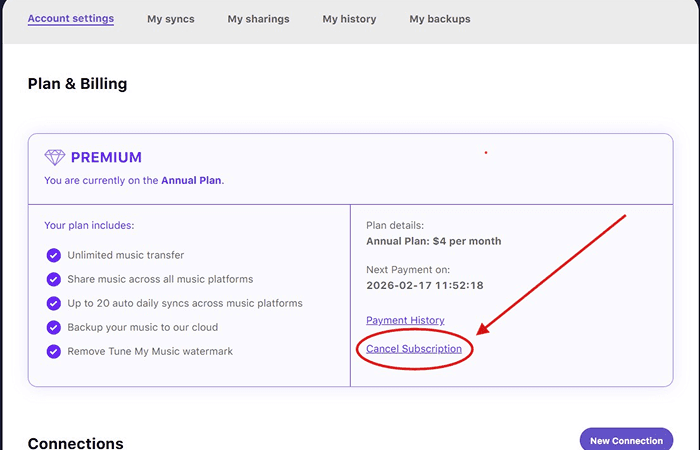
Once you complete the cancellation you'll see a message confirming the date your subscription will end. Your cancellation takes effect at the end of your current billing period. You'll also receive a confirmation email - keep it as proof of cancellation.
What happens after you cancel
You keep access until the end of your billing period. If you're on a monthly plan, you can keep using all premium features until your next renewal date. You won't be charged again.
Your transferred music stays where it is. Any playlists or songs you've already moved to another platform remain there. Canceling TuneMyMusic has no effect on music that's been transferred.
Your account stays open. You'll be downgraded to the free plan, which lets you transfer up to 500 tracks. You can resubscribe at any time.
Still being charged after canceling?
Frequently asked questions
I subscribed through PayPal or Paddle. Does the process differ?
I can't find the Cancel Subscription button.
Will I lose my sync settings?
Need more help?
If you run into any issues, our support team is here to help.
Contact SupportWas this helpful?
Published Date: July 20, 2026