
Använder officiella API:er och säkra datarutiner
Spellistaorganisatör för alla musikplattformar
Har du någonsin frågat dig själv "hur man tar bort spellistor på Spotify" eller letat efter ett sätt att ta bort dubbletter på Spotify? Då har du tur! Vi har byggt den perfekta spellisteorganisatören som fungerar på alla musikplattformar, inte bara på Spotify!
Att organisera spellistor har aldrig varit enklare
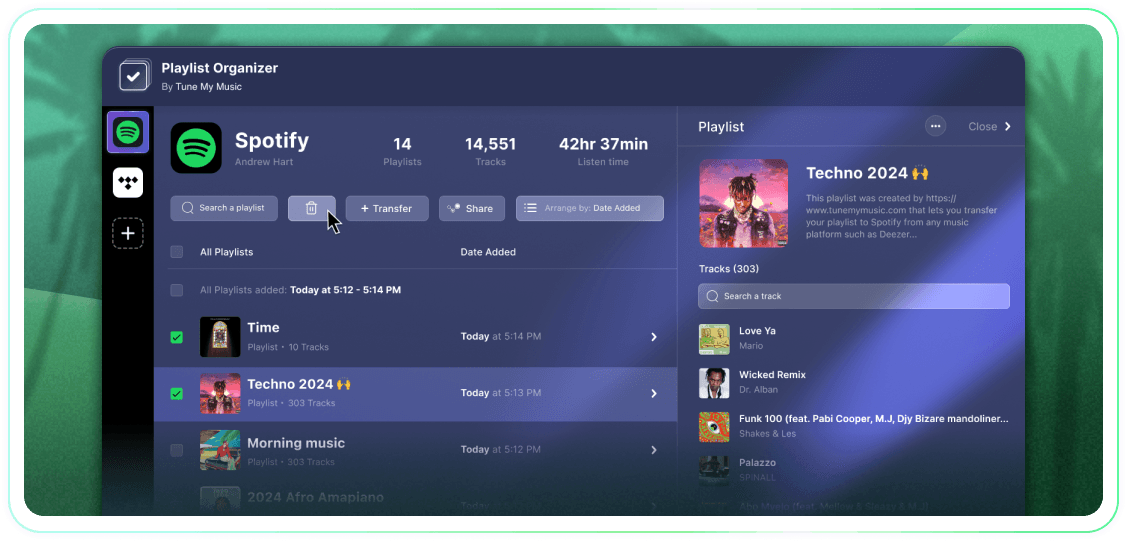
Ta full kontroll över dina spellistor med massåtgärder, grupperingar efter tilläggsdatum och ett klick för att sluta följa eller ta bort. Det är ett enkelt verktyg som får jobbet gjort.
Tune My Music är Den officiella musiköverföringslösningen, betrodd av de största varumärkena i branschen

Hur tar man bort en Spotify-spellista?
På Spotify (och många andra plattformar) finns det inga inbyggda knappar för att välja och ta bort flera.Så när du behöver radera mer än en spellista kommer du att upptäcka att det tar en evighet och känns mycket svårare än det borde.Det är därför vi skapade Spellista Organisatören.Nu kan du välja så många spellistor du vill och ta bort dem alla med ett klick från vilken enhet som helst - dator eller mobil.
Hur kan jag ta bort mer än en spellista åt gången?
Använd Spellista Organisatören för att effektivisera processen.Börja med att bläddra i din samling och välja ett antal spellistor du vill ta bort genom att klicka i rutorna bredvid dem.När du har gjort ditt val klicka på ta bort-knappen - och så är du klar.Detta låter dig hantera och rensa ditt Spotify-konto enkelt, oavsett hur många spellistor du vill ta bort på en gång.
Vad händer med en spellista som jag slutar följa?
När du tar bort en spellista via Tune My Music Spellista Organisatör använder vårt verktyg Spotify API för att "avfölja" den från ditt konto.Detta raderar omedelbart spellistan från ditt bibliotek och profilens sidofält, även om den kvarstår på Spotifys servrar.Denna metod säkerställer att din radering är icke-destruktiv: följare kommer inte att förlora åtkomsten, och du kan helt återställa spellistan senare genom din Spotify "Återställ Spellistor"-sida eller med hjälp av dess direktlänk.Observera att när du har avföljt förlorar du möjligheten att redigera spellistorna eller deras titel tills du följer dem igen.
Spellista Organiserare
Av Tune My Music