
使用官方 API 和安全的資料實踐
適用於所有音樂平台的播放清單管理器
你是否曾問過自己「如何在Spotify上刪除播放清單」或尋找過Spotify重複播放清單刪除工具?那麼,你真是太幸運了!我們打造了一個完美的播放清單整理工具,它不僅適用於Spotify,也適用於任何音樂平台!
選擇音樂平台
整理播放清單從未如此簡單
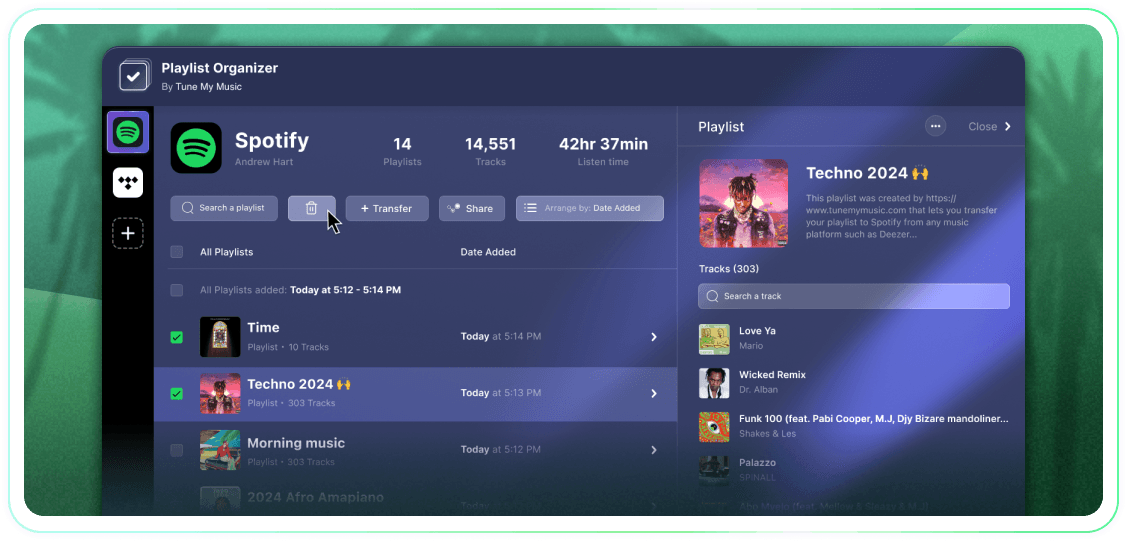
使用批次操作、按新增日期分組以及一鍵取消追蹤或刪除,全面掌控您的播放清單。這是一款簡單易用的工具,能夠輕鬆完成任務。
認證
Tune My Music 是官方音樂傳輸解決方案,深受業界各大品牌的信賴。

如何刪除Spotify播放清單?
在 Spotify(以及許多其他平台)上,沒有內建的批量選擇和刪除按鈕。因此,當您需要刪除多個播放列表時,您會發現這需要很多時間,並且感覺比應該的更加困難。這就是我們建立播放列表管理器的原因。現在你可以選擇任意數量的播放列表,並在任何裝置上(桌面或手機)一鍵刪除它們。
如何一次刪除多個播放清單?
使用播放列表管理器來簡化過程。請先瀏覽您的收藏,並通過單擊旁邊的複選框選擇您希望移除的任意數量的播放列表。一旦你做出選擇,點擊刪除按鈕就完成了。這使您能夠輕鬆管理和清理您的 Spotify 帳戶,而不管您想一次移除多少個播放列表。
如果我取消追蹤某個播放列表,它會怎麼樣?
當您通過 Tune My Music 播放列表管理器移除播放列表時,我們的工具使用 Spotify API 將其從您的帳戶中 "取消關注"。這會立即將播放列表從您的庫和個人資料側邊欄中清除,但它仍然保留在 Spotify 伺服器上。這種方法確保您的刪除是非破壞性的:關注者不會失去訪問權限,您可以通過 Spotify 的 "恢復播放列表" 頁面或使用其直接鏈接,稍後完全恢復播放列表。請注意,一旦取消關注,您將無法編輯播放列表的曲目或標題,直到您再次關注。
常見問題
如何在Spotify上刪除播放清單?
Spotify 並不會真正刪除播放清單——而是透過取消追蹤來將其從你的音樂庫中移除。你可以使用播放清單管理器一次取消追蹤一個或多個播放清單。
我可以一次刪除多個播放清單嗎?
是的!播放清單管理器可讓您使用複選框選擇多個播放列表,然後一鍵取消關注所有播放列表—無需逐一操作。
如果我取消追蹤某個播放列表,它會怎麼樣?
播放清單會從您的音樂庫和個人資料中消失,但它仍然存在於 Spotify 上。如果其他人追蹤了該播放列表,他們仍然可以看到並播放它。您可以隨時使用其連結重新關注它,Spotify 也允許您在限定時間內從帳戶設定中恢復已取消追蹤的播放清單。
這個功能可以在任何裝置上使用嗎?
是的,播放清單管理器可以在所有裝置的桌面和行動瀏覽器上運作。
這個功能只能用在Spotify嗎?
不,播放清單管理器支援所有主流音樂平台,包括 Spotify、YouTube Music、Apple Music、Deezer、Tidal、Amazon Music 等。
Tune My Music 究竟是什麼?
Tune My Music 是一個用於管理您在不同串流媒體服務上音樂的平台。您可以將播放清單傳輸、整理、分享和備份到 20 多個平台。
我可以在 Instagram Stories 上分享我的 Spotify 歌單嗎?
是的,您可以產生可分享的鏈接,並將其分享到包括 Instagram Stories 在內的任何社交平台。
當我刪除Spotify上的播放清單時會發生什麼事?
由於 Spotify 將播放清單視為社交項目而非文件,因此刪除實際上意味著取消關注。播放清單連結對已擁有該清單的用戶仍然有效,您也可以在 Spotify 帳戶設定中恢復它。