
يستخدم واجهات برمجة التطبيقات الرسمية وممارسات البيانات الآمنة
منظم قوائم التشغيل لكل منصة موسيقية
هل تساءلت يوماً "كيف أحذف قائمة تشغيل على سبوتيفاي؟" أو بحثت عن برنامج لإزالة القوائم المكررة؟ حسناً، أنت محظوظ! لقد صممنا برنامجاً مثالياً لتنظيم قوائم التشغيل، يعمل على جميع منصات الموسيقى، وليس فقط على سبوتيفاي!
لم يكن تنظيم قوائم التشغيل أسهل من أي وقت مضى
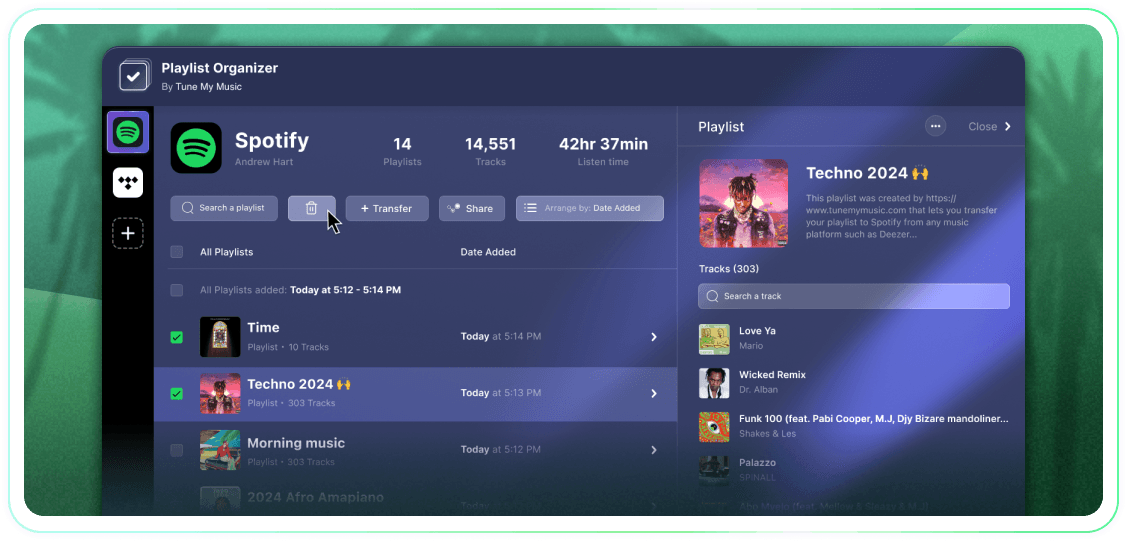
تحكّم بشكل كامل في قوائم التشغيل الخاصة بك من خلال إجراءات جماعية، وتصنيفها حسب تاريخ الإضافة، وإمكانية إلغاء المتابعة أو الحذف بنقرة واحدة. إنها أداة بسيطة وفعّالة.
Tune My Music هو الحل الرسمي لنقل الموسيقى، وهو محل ثقة أكبر العلامات التجارية في هذا المجال.

كيفية حذف قائمة تشغيل Spotify؟
في Spotify (وعديد من المنصات الأخرى) لا توجد أزرار مدمجة لاختيار وحذف بكميات كبيرة.لذا عندما تحتاج إلى حذف أكثر من قائمة تشغيل، ستجد أن الأمر يستغرق وقتاً طويلاً ويشعر بأنه أصعب بكثير مما ينبغي.لهذا السبب أنشأنا منظم قوائم التشغيل.الآن يمكنك اختيار أكبر عدد من قوائم التشغيل التي تريدها وحذفها جميعًا بنقرة واحدة من أي جهاز - سطح المكتب أو الهاتف المحمول.
كيف يمكنني حذف أكثر من قائمة تشغيل واحدة في المرة الواحدة؟
استخدم منظم قوائم التشغيل لتبسيط العملية.ابدأ بتصفح مجموعتك واختيار أي عدد من قوائم التشغيل التي تريد إزالتها من خلال النقر على مربعات الاختيار بجانبها.بمجرد أن تقوم بإجراء اختيارك، انقر على زر الحذف - وقد انتهيت.يسمح لك ذلك بإدارة وتنظيف حسابك على سبوتيفاي بسهولة، بغض النظر عن عدد قوائم التشغيل التي تريد إزالتها دفعة واحدة.
ماذا يحدث لقائمة التشغيل التي ألغي متابعتها؟
عندما تقوم بإزالة قائمة تشغيل عبر منظم قوائم التشغيل من Tune My Music، تستخدم أداتنا واجهة برمجة تطبيقات سبوتيفاي "لإلغاء متابعتها" من حسابك.هذا يزيل قائمة التشغيل على الفور من مكتبتك وشريط جانبي ملفك الشخصي، رغم أنها تبقى على خوادم سبوتيفاي.تضمن هذه الطريقة أن تكون عملية الحذف غير مدمرة: لن يفقد المتابعون الوصول، ويمكنك استعادة قائمة التشغيل بالكامل لاحقاً من خلال صفحة "استعادة قوائم التشغيل" الخاصة بك على سبوتيفاي أو باستخدام رابطها المباشر.يرجى ملاحظة أنه أثناء إلغاء المتابعة، ستفقد القدرة على تعديل مسارات أو عنوان قائمة التشغيل حتى تقوم بمتابعتها مرة أخرى.
منظم قوائم التشغيل
بواسطة Tune My Music